“복잡한 기계도 한눈에?” VR 헤드셋 분해 조립도 포스터 만드는 3가지 비결
“복잡한 기계도 한눈에?” VR 헤드셋 분해 조립도 포스터 만드는 3가지 비결
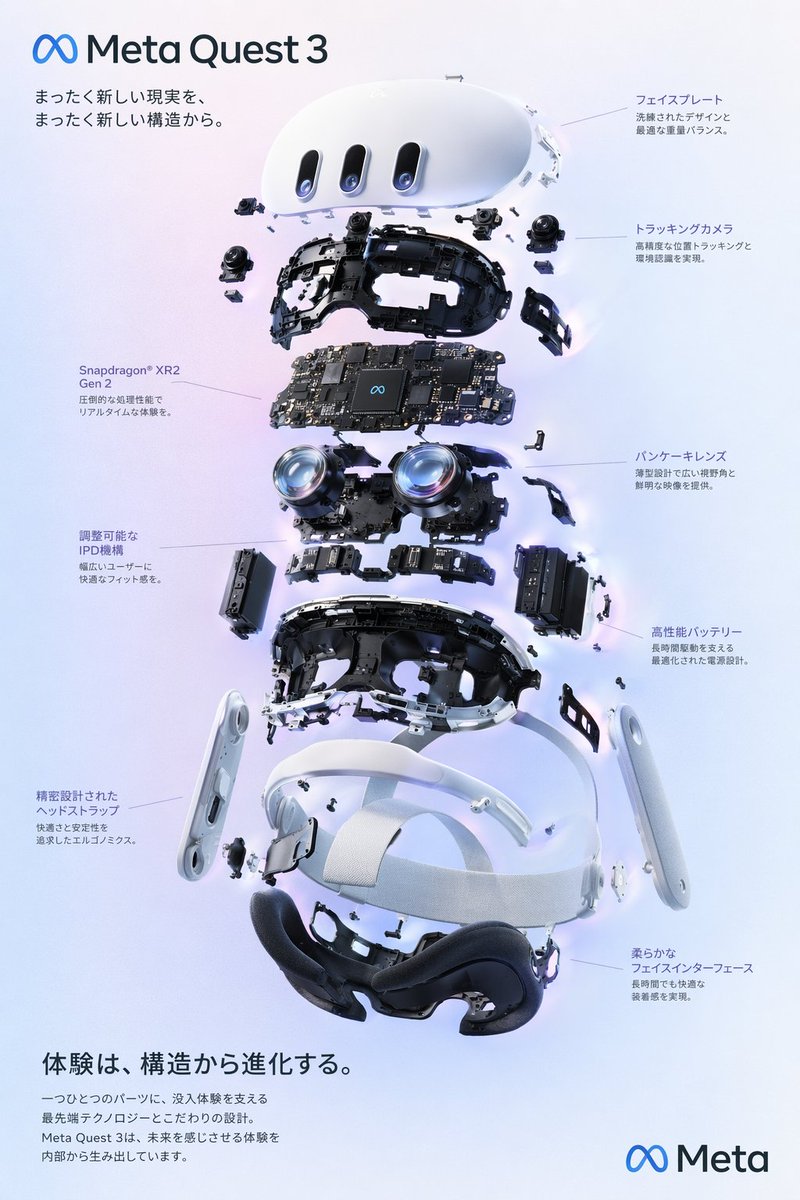
출처: 미상 · YouMind
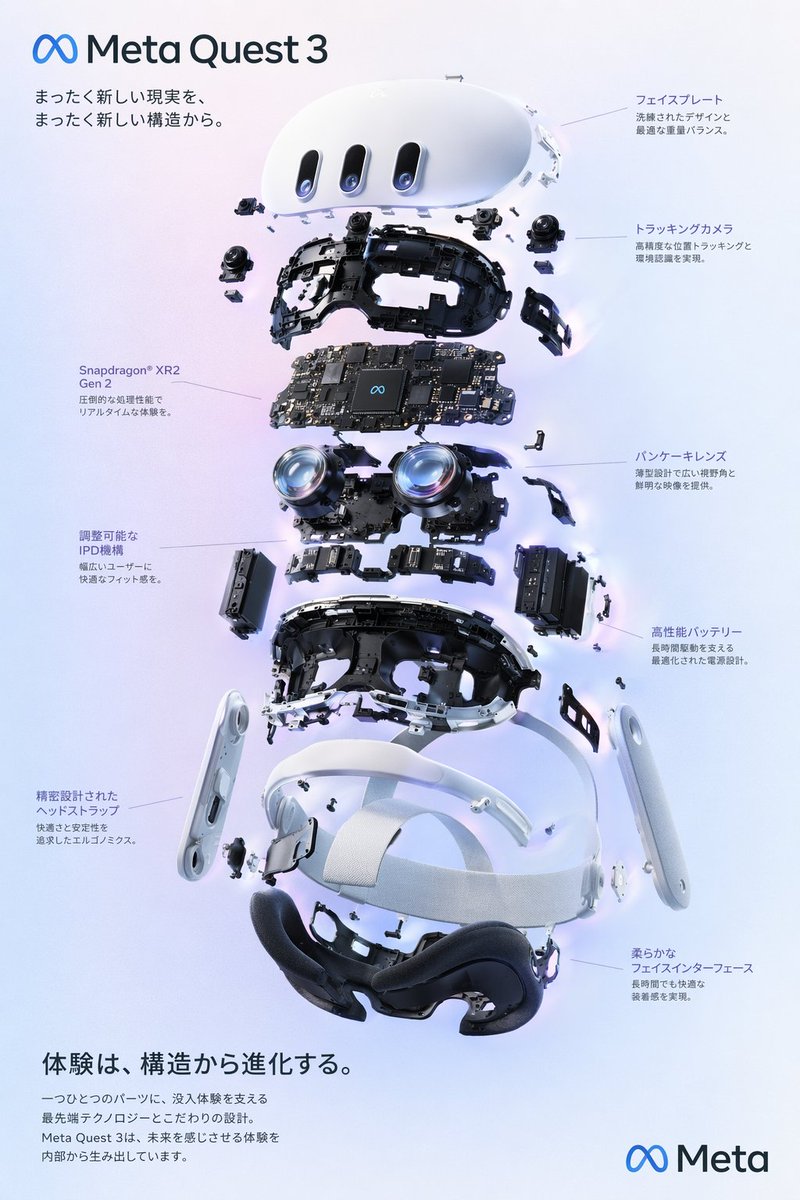
최근 YouMind 커뮤니티에서 화제가 된 VR 헤드셋 분해 조립도 스타일의 인포그래픽, 다들 보셨나요? 마치 첨단 기술 매뉴얼을 보는 듯한 정교함과 깔끔한 레이아웃이 돋보이는 이 이미지는 교육용 자료나 테크 디자인 소스로 활용하기에 아주 좋습니다. 오늘은 GPT Image 2와 같은 고성능 모델로 이런 전문적인 도면 이미지를 구현하는 노하우를 정리해 드립니다.
🎬 이런 스타일이란
이 스타일은 기계의 내부 구조를 투명하게 보여주는 ‘익스플로디드 뷰(Exploded View)’ 기법을 활용합니다. 부품들이 공중에 떠 있는 듯한 입체적인 구도와 함께, 각 부품을 지시하는 선(Leader lines)과 기술적인 텍스트가 어우러져 전문적인 인포그래픽 느낌을 자아냅니다. 차가운 금속성 질감과 정갈한 그리드 시스템이 핵심입니다.
✍️ 프롬프트 접근법
성공적인 도면 이미지를 위해서는 다음 4가지 요소를 프롬프트에 녹여내는 것이 중요합니다.
- 피사체 명시: VR 헤드셋의 핵심 부품(렌즈, 센서, 회로 기판, 스트랩)을 구체적으로 언급하세요.
- 구도 설정: ‘Exploded view diagram’, ‘Isometric projection’이라는 키워드를 사용하여 부품이 분리된 상태를 명확히 지시합니다.
- 시각적 요소: ‘Technical annotation’, ‘Blueprint style’, ‘Clean white background’를 추가해 도면 특유의 깔끔함을 강조하세요.
- 색감 및 조명: ‘Studio lighting’, ‘Minimalist color palette’를 통해 복잡한 부품들이 시각적으로 혼란스럽지 않게 정리합니다.
[Option 1: 정밀한 기술 도면 스타일]
A high-detail technical exploded view of a futuristic VR headset, floating components showing internal lenses, sensors, and circuit boards. Isometric projection, clean white background, thin black technical lines, professional blueprint aesthetic, minimalist color palette with cyan accents, 8k resolution, sharp focus.
A high-detail technical exploded view of a futuristic VR headset, floating components showing internal lenses, sensors, and circuit boards. Isometric projection, clean white background, thin black technical lines, professional blueprint aesthetic, minimalist color palette with cyan accents, 8k resolution, sharp focus.
[Option 2: 현대적인 제품 홍보 포스터 스타일]
A sleek, modern infographic poster of a VR headset disassembled into modular parts. Soft studio lighting, metallic and matte plastic textures, floating parts arranged in a grid, elegant typography placeholders, high-tech industrial design, professional product visualization style.
A sleek, modern infographic poster of a VR headset disassembled into modular parts. Soft studio lighting, metallic and matte plastic textures, floating parts arranged in a grid, elegant typography placeholders, high-tech industrial design, professional product visualization style.
💡 활용 팁
- 텍스트 제어: AI가 생성하는 텍스트는 완벽하지 않을 수 있습니다. 캔바(Canva)나 포토샵을 활용해 실제 제품 사양을 텍스트로 덧입히면 훨씬 완성도 높은 포스터가 됩니다.
- 색상 강조: 특정 부품을 강조하고 싶다면 ‘Highlighting specific components in orange’와 같이 색상 지시어를 추가해 보세요.
- 비율 조절: 포스터 용도로 사용하려면 프롬프트 끝에 ‘–ar 2:3’ 또는 ‘–ar 9:16’과 같은 화면 비율 옵션을 추가하는 것을 잊지 마세요.
#AI이미지생성 #프롬프트엔지니어링 #VR헤드셋 #인포그래픽디자인 #기술도면 #GPTImage2 #디자인소스