“나만의 레트로 게임 음악을 만들까?” 픽셀 몬스터 뮤직 시퀀서 UI 디자인 노하우
“나만의 레트로 게임 음악을 만들까?” 픽셀 몬스터 뮤직 시퀀서 UI 디자인 노하우
출처: 미상 · YouMind
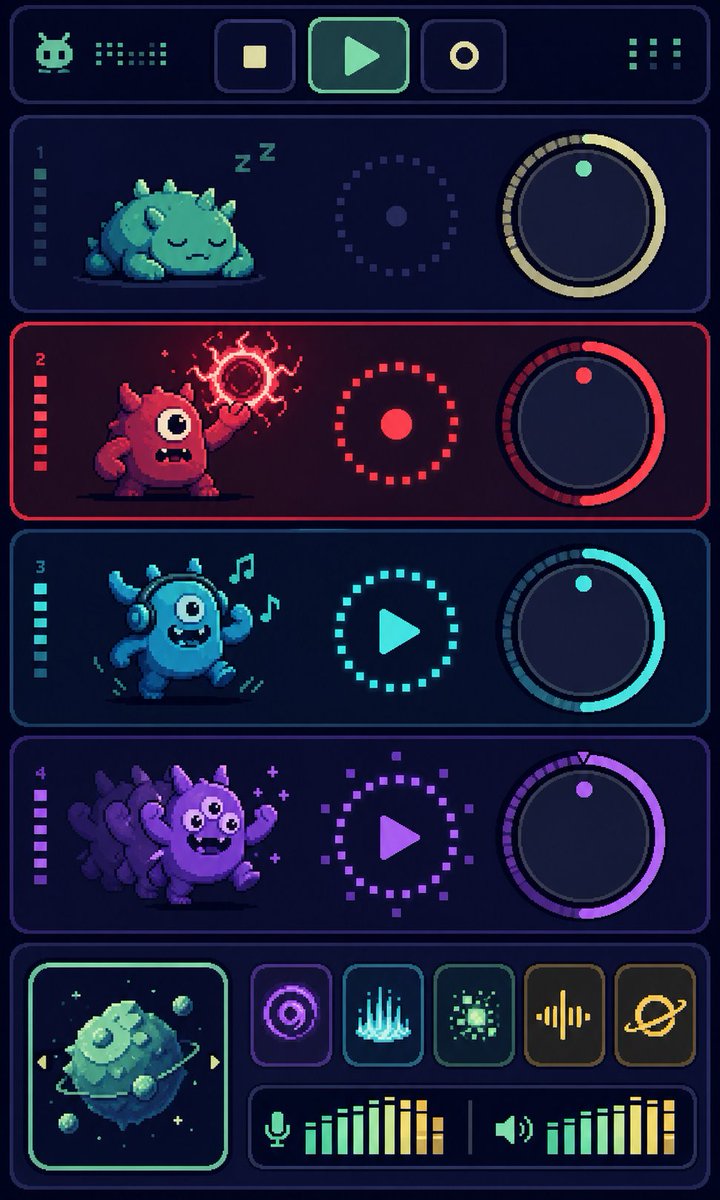
최근 YouMind 커뮤니티에서 화제가 된 픽셀 몬스터 뮤직 시퀀서 디자인을 보셨나요? 귀여운 몬스터 캐릭터와 레트로한 신디사이저 인터페이스가 결합된 독특한 스타일은 앱 디자인이나 게임 UI를 구상하는 분들에게 큰 영감을 줍니다. 오늘은 GPT Image 2 모델을 활용해 이런 감각적인 픽셀 아트 UI를 구현하는 방법을 정리해 드립니다.
🎬 이런 스타일이란
이 스타일은 8비트 게임기의 향수를 자극하는 ‘픽셀 아트(Pixel Art)’와 현대적인 ‘뮤직 시퀀서 UI’가 결합된 형태입니다. 단순히 픽셀로 그림을 그리는 것을 넘어, 실제 작동할 것 같은 노브(Knob), 슬라이더, 오디오 미터 등을 배치하여 기능적인 미학을 강조하는 것이 핵심입니다. 몬스터라는 캐릭터 요소를 트랙별로 배치해 시각적인 재미를 더한 것이 특징이죠.
✍️ 프롬프트 접근법
성공적인 UI 디자인을 얻기 위해서는 다음 4가지 요소를 프롬프트에 녹여내야 합니다.
- 피사체 구성: 4개 이상의 독립적인 트랙 섹션을 명시하세요. 각 트랙마다 다른 개성을 가진 픽셀 몬스터를 배치해 시각적 구분을 돕습니다.
- 인터페이스 요소: ‘회전 가능한 노브(rotary knobs)’, ‘슬라이딩 페이더(sliding faders)’, ‘LED 오디오 레벨 미터’와 같은 구체적인 UI 컴포넌트를 언급해야 합니다.
- 색감과 조명: 네온 컬러의 포인트와 어두운 배경을 대비시켜 ‘사이버펑크 레트로’ 분위기를 연출하세요. 픽셀 아트 특유의 선명한 경계선을 위해 ‘sharp edges’ 키워드를 추가하는 것이 좋습니다.
- 구도: ‘수직형 대시보드(Vertical dashboard layout)’ 혹은 ‘아이소메트릭 뷰(Isometric view)’를 지정하면 훨씬 정돈된 느낌의 UI를 얻을 수 있습니다.
[Option 1: 다크 모드 레트로]
A vertical music sequencer UI design, 8-bit pixel art style. Four distinct tracks, each featuring a unique cute pixel monster character. The interface includes glowing neon rotary knobs, sliding faders, and digital LED audio meters. Dark charcoal background with vibrant cyan and magenta accents. Sharp, clean pixel edges, high-tech retro gaming aesthetic.
A vertical music sequencer UI design, 8-bit pixel art style. Four distinct tracks, each featuring a unique cute pixel monster character. The interface includes glowing neon rotary knobs, sliding faders, and digital LED audio meters. Dark charcoal background with vibrant cyan and magenta accents. Sharp, clean pixel edges, high-tech retro gaming aesthetic.
[Option 2: 팝한 컬러풀 스타일]
Isometric view of a retro synthesizer dashboard. Four colorful pixel monsters integrated into the track controls. Play/Pause buttons, frequency sliders, and waveform displays in a pixelated art style. Bright pastel color palette, clean UI layout, professional game asset design, high resolution, 2D flat vector style with pixel texture.
Isometric view of a retro synthesizer dashboard. Four colorful pixel monsters integrated into the track controls. Play/Pause buttons, frequency sliders, and waveform displays in a pixelated art style. Bright pastel color palette, clean UI layout, professional game asset design, high resolution, 2D flat vector style with pixel texture.
💡 활용 팁
- 일관성 유지: 몬스터의 스타일이 너무 제각각이면 UI가 지저분해 보일 수 있습니다. ‘일관된 픽셀 아트 스타일(consistent pixel art style)’이라는 문구를 프롬프트 끝에 추가해 보세요.
- 기능 강조: 특정 버튼이 강조되길 원한다면 ‘highlighted play button’이나 ‘glowing active track’과 같은 표현을 사용해 시선을 유도할 수 있습니다.
- 비율 설정: 모바일 앱 UI를 구상 중이라면 프롬프트에 ‘9:16 aspect ratio’를 명시하여 세로형 레이아웃을 확보하는 것이 좋습니다.
#AI디자인 #픽셀아트 #UI디자인 #뮤직시퀀서 #GPTImage2 #레트로게임 #디지털아트