“VR 헤드셋 내부가 궁금해?” 3분 만에 완성하는 고퀄리티 분해 조립도 제작 노하우
“VR 헤드셋 내부가 궁금해?” 3분 만에 완성하는 고퀄리티 분해 조립도 제작 노하우
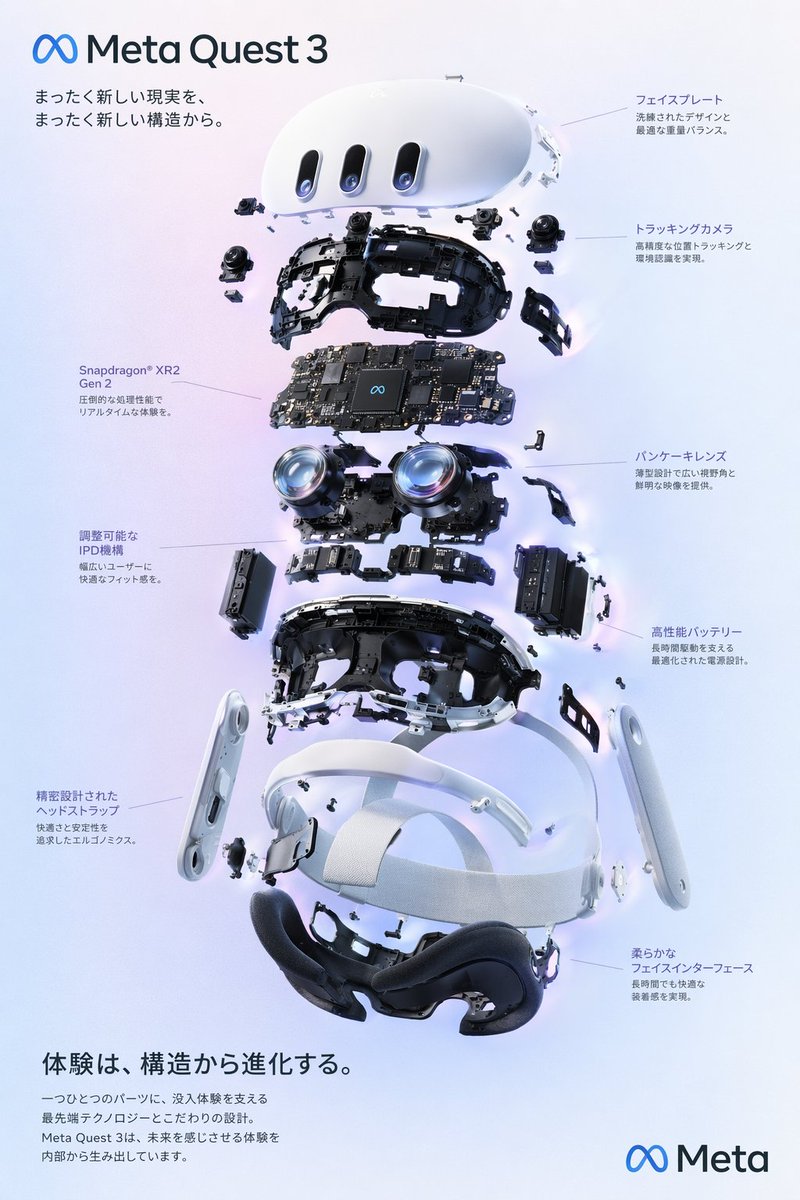
출처: 미상 · YouMind
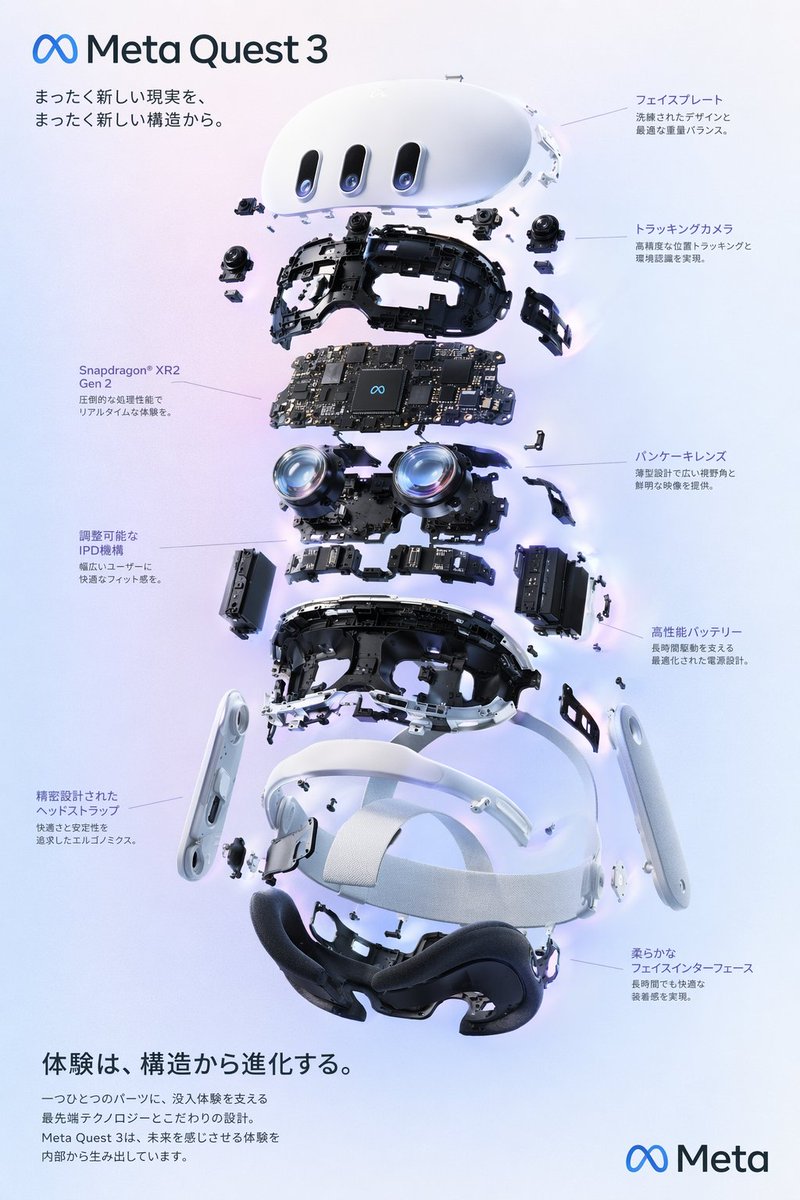
최근 YouMind에서 공개된 VR 헤드셋 분해 조립도 이미지가 테크 마니아들 사이에서 큰 화제입니다. 마치 실제 공학 설계도를 보는 듯한 정교함과 깔끔한 인포그래픽 스타일은 교육용 자료나 포스터로 활용하기에 더할 나위 없는데요. 오늘은 GPT Image 2 모델을 활용해 누구나 전문가 수준의 테크니컬 일러스트를 뽑아낼 수 있는 프롬프트 전략을 정리해 드립니다.
🎬 이런 스타일이란
이 스타일은 복잡한 기계 장치를 분해하여 각 부품을 입체적으로 배치하는 ‘폭발도(Exploded View)’ 기법을 사용합니다. 단순히 기기를 보여주는 것을 넘어, 각 부품에 번호를 매기거나 지시선을 연결해 전문적인 기술 문서 느낌을 주는 것이 핵심입니다. 차가운 금속 질감과 정갈한 레이아웃이 결합되어 미래지향적인 분위기를 자아냅니다.
✍️ 프롬프트 접근법
고품질의 분해 조립도를 얻기 위해서는 다음 4가지 요소를 프롬프트에 반드시 포함해야 합니다.
- 피사체 및 구도: ‘Exploded view diagram’이라는 키워드를 사용하여 부품이 공중에 떠 있는 듯한 입체적인 구도를 설정하세요.
- 디테일 묘사: ‘Detailed internal components’, ‘circuit boards’, ‘optical lenses’와 같은 구체적인 부품 명칭을 나열하면 결과물의 밀도가 올라갑니다.
- 조명 및 색감: ‘Studio lighting’, ‘clean white background’를 조합해 부품의 그림자가 명확하게 보이도록 설정하고, 포인트 컬러로 ‘Electric blue’나 ‘Neon accent’를 추가하면 세련미가 더해집니다.
- 텍스트 요소: ‘Technical annotations’, ‘labels’, ‘schematic typography’를 명시하여 인포그래픽적인 느낌을 강조하세요.
[옵션 1: 정밀 공학 스타일]
An exploded view diagram of a futuristic VR headset, showcasing internal lenses, sensors, and circuit boards floating in mid-air. Professional technical illustration style, clean white background, soft studio lighting, sharp focus on mechanical details, minimalist labels and schematic lines, 8k resolution, high-tech aesthetic.
An exploded view diagram of a futuristic VR headset, showcasing internal lenses, sensors, and circuit boards floating in mid-air. Professional technical illustration style, clean white background, soft studio lighting, sharp focus on mechanical details, minimalist labels and schematic lines, 8k resolution, high-tech aesthetic.
[옵션 2: 다크 모드 인포그래픽]
A dark-themed technical poster of a disassembled VR device. Exploded parts arrangement, glowing neon blue accents on circuit paths, matte black background, cinematic lighting, hyper-realistic textures, technical annotations and measurement lines, sleek industrial design, high contrast.
A dark-themed technical poster of a disassembled VR device. Exploded parts arrangement, glowing neon blue accents on circuit paths, matte black background, cinematic lighting, hyper-realistic textures, technical annotations and measurement lines, sleek industrial design, high contrast.
💡 활용 팁
- 비율 설정: 포스터로 활용할 계획이라면 프롬프트 끝에 ‘–ar 2:3’ 또는 ‘–ar 9:16’과 같은 화면 비율 옵션을 추가해 세로형으로 생성하는 것이 좋습니다.
- 일관성 유지: 특정 부품의 색상을 강조하고 싶다면 ‘highlighting the optical sensor in orange’와 같이 특정 부위를 지정해 보세요.
- 텍스트 수정: AI가 생성한 이미지 속의 텍스트가 깨져 보인다면, 캔바(Canva)나 포토샵을 이용해 깔끔한 폰트로 텍스트를 덧입히는 것이 훨씬 전문적인 결과물을 만듭니다.
#AI이미지 #VR헤드셋 #프롬프트엔지니어링 #테크니컬일러스트 #인포그래픽 #GPTImage2 #쇼룸잉