“라이브 커머스 매출 2배 올리는” 고퀄리티 UI 목업 만드는 3가지 방법
“라이브 커머스 매출 2배 올리는” 고퀄리티 UI 목업 만드는 3가지 방법
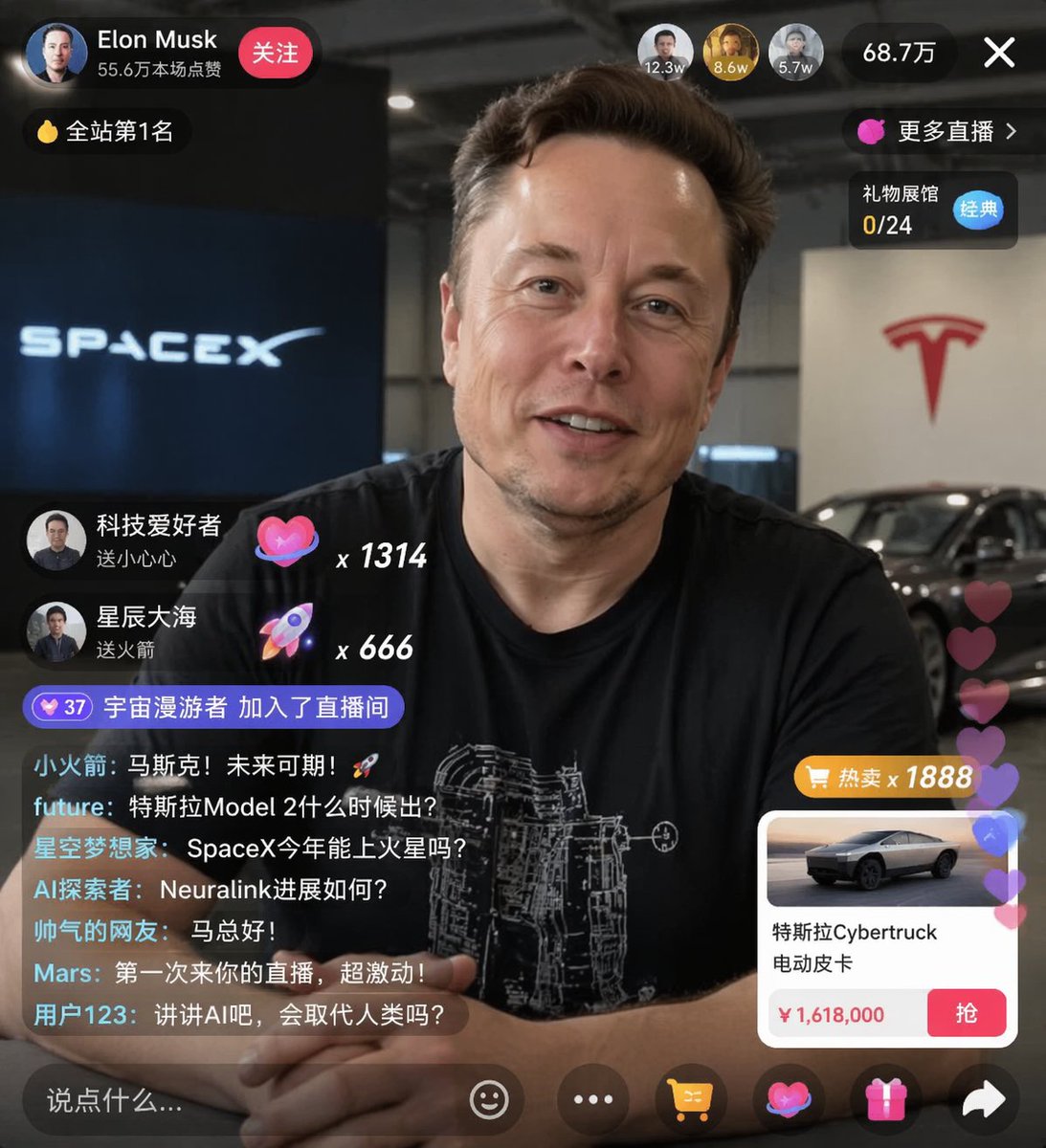
출처: 미상 · YouMind
쇼핑몰 운영자나 앱 디자이너라면 한 번쯤 고민해봤을 라이브 스트리밍 화면, 이제 AI로 직접 기획하고 시각화할 수 있습니다. YouMind에서 공유된 GPT Image 2 기반의 라이브 커머스 UI 스타일에서 영감을 받아, 실제 서비스에 바로 적용 가능한 고퀄리티 목업 생성 노하우를 정리했습니다.
🎬 이런 스타일이란
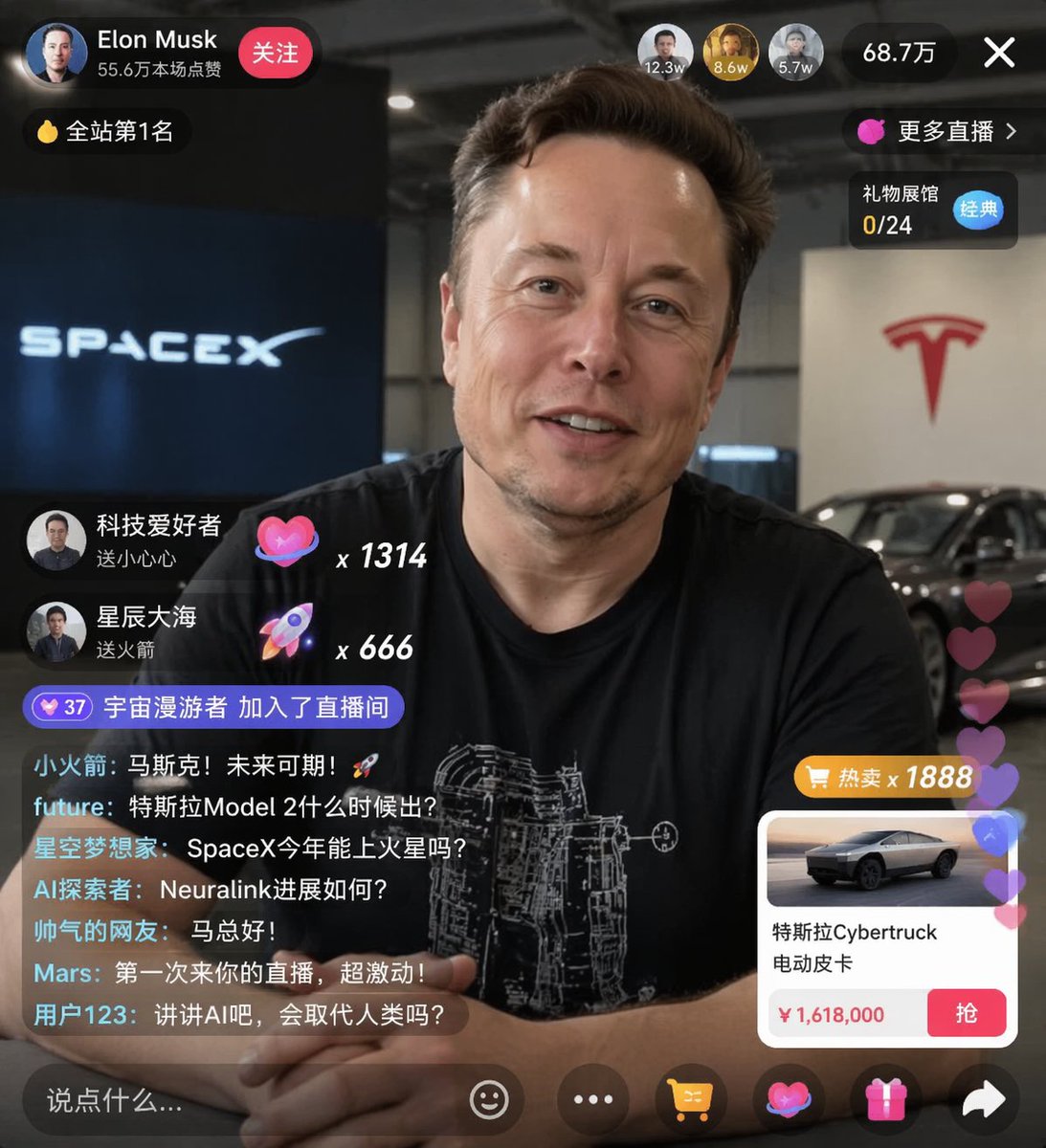
인물 중심의 라이브 방송 화면 위에 투명도 높은 인터페이스가 겹쳐진 형태입니다. 실시간 채팅창, 하트 아이콘, 상품 구매 버튼 등이 자연스럽게 배치되어 실제 앱을 켜놓은 듯한 몰입감을 주는 것이 특징입니다. 단순히 화면을 그리는 것을 넘어, 브랜드의 아이덴티티를 담은 UI/UX 디자인 시안으로 활용하기 좋습니다.
✍️ 프롬프트 접근법
성공적인 UI 목업을 위해서는 다음 4가지 요소를 프롬프트에 반드시 포함해야 합니다.
- 피사체(Subject): 모델의 표정과 포즈를 구체적으로 묘사하세요. (예: 밝게 웃으며 제품을 들고 있는 여성)
- 인터페이스(UI Elements): 채팅창, 하트 아이콘, 상품 카드(가격, 구매 버튼) 등 필수 요소를 명시합니다.
- 조명 및 색감(Lighting & Color): 스튜디오 조명 혹은 따뜻한 자연광을 설정하고, 브랜드 컬러를 지정하면 결과물의 완성도가 높아집니다.
- 카메라 무빙(Camera): 인물을 강조하는 클로즈업 샷이나, 화면 전체를 보여주는 미드 샷을 선택해 구도를 고정하세요.
[프롬프트 1: 뷰티 브랜드 라이브]
High-quality mobile app UI mockup, a professional beauty influencer presenting a skincare product, bright studio lighting, soft pastel color palette, overlay interface with floating heart icons, live chat feed on the left, product purchase card at the bottom with a ‘Buy Now’ button, photorealistic, 8k resolution.
High-quality mobile app UI mockup, a professional beauty influencer presenting a skincare product, bright studio lighting, soft pastel color palette, overlay interface with floating heart icons, live chat feed on the left, product purchase card at the bottom with a ‘Buy Now’ button, photorealistic, 8k resolution.
[프롬프트 2: 패션 의류 라이브]
E-commerce live streaming interface design, a stylish model wearing trendy streetwear, urban loft background, cinematic lighting, sleek dark-mode UI overlay, semi-transparent chat bubbles, discount coupon pop-up, product carousel at the bottom, modern typography, clean aesthetic.
E-commerce live streaming interface design, a stylish model wearing trendy streetwear, urban loft background, cinematic lighting, sleek dark-mode UI overlay, semi-transparent chat bubbles, discount coupon pop-up, product carousel at the bottom, modern typography, clean aesthetic.
💡 활용 팁
- 브랜드 컬러 적용: 프롬프트 끝에 ‘Accent color: #FF5733’과 같이 특정 색상 코드를 추가하면 브랜드 아이덴티티가 반영된 UI를 얻을 수 있습니다.
- 디바이스 프레임: 결과물에 스마트폰 외곽선(프레임)이 필요하다면 ‘inside a modern smartphone frame’이라는 문구를 추가해 보세요.
- 반복 생성: UI 요소는 AI가 매번 다르게 생성할 수 있으므로, 원하는 배치가 나올 때까지 시드(Seed) 값을 고정하거나 여러 번 생성하여 가장 적합한 레이아웃을 선택하세요.
#AI디자인 #라이브커머스 #UI목업 #GPTImage2 #앱디자인 #쇼핑몰창업 #프롬프트엔지니어링